.png)
Brief
PayDay application provides payroll & people management approaches. It allows HR department to access complete employee life cycle details initiating from the joining formalities to retiring procedures.
Requirement
Simplify the whole product function by making it highly usable to every persona. Redesign and enhance the user experience of the application
My Role
As the Sr.UX Designer on this project, I conducted user research, determined the user flow and user personas, designed the wireframes, created prototypes, create design system, handover screen to engineering team review developed screen and ran usability tests.
Team
Manikandan - PM
Ankush - Engineer Head & Team (25)
Design Story
“The technology was there, it was simply not that easy to use.”
The first step is to analyse the user experience of the existing application,I had to check where the problems lie currently. Lack of guidance plays a big role in this application and even if managers and HR employees are aware, they struggle to provide enough valuable information that will help employees feel more at ease. But the reality is that this knowledge is scattered in multiple features and modules, and in most cases, it is never delivered properly.
The present system which is being used by different stakeholders has got numerous features and unfriendly layout, I can say the data is not presented well. I did intensive research on the present design by talking to different users and stakeholders.

UX Strategy
As UX designer always does as much as possible to understand the context of the user experience and the core problems that need solving.
Audit of the current
user experience in the old product
Interview with Employee, Managers, HR & Admin to look at the UX from their perspective
Stakeholder interviews with team members previously involved in creating the product
Review of
behavioural analytics of the current users
Challenge
Problem Definition
“The challenge is about taking things that are infinitely complex and making them simpler and more understandable”
Rethinking a comprehensive solution for payroll application for companies. A brief story on how I approached the redesign and how enhance the user experience of the application
1. Solving the problems to make
the redesign a successful one!
The core issues were the functional architecture of the application and the understandability of certain key features, which prevented the users from extracting maximum value from the application’s offering.
3. Minimizing the user load
The more consistent the elements is throughout the application, the less effort is needed to learn and remember the interface. The less effort is required, the more meaningful will be the work produced in the tool.
System feedback / Choosing appropriate UI controls
/ Lack of user help
2. No Proper architecture and navigation defined
There were several problems with navigation through the application, which was related to the way particular screens were grouped and to the fact, that they didn’t necessarily support particular user flows in the application.
4. Small usability problems can turn into big user experience problems
When analysing user experience, we often look out not only for high-level issues. The small problems matter a lot too, especially when they aggregate in tens or hundreds across 50 different application screens. Features were not clear for the users and they think their task are time consuming.
UX Research
User Interview : Focus Group
User Interview : One on one
Analyze the users
Based on existing customers, in order to better understand their motivations and difficulties, I participate in the company’s user workshop , where I met the users to discuss their current problems, propose solutions and finally draw conclusions with these inputs.
How it Helps
Brainstorming session helps to list down the key points how it help to category of users
Employee
-
Check payslip generated
-
To track their leave status
-
Apply their Reimbursement
-
Record their attendance
-
Web Checkin and Checkout
-
To check leave credit balance and download report
-
Send timesheet for approval
-
Declare investments
Manager
-
Approve team request
-
Check team report
-
Add quarterly variable pay
-
Approve timesheet
-
To check team logged hours, leaves
-
To check team work hours daily, weekly, monthly and generate report
HR
-
Salary setup
-
Assign Manger to employee's
-
Assign Project to employee's
-
Be half of employee raise attendance, apply leave and approve
-
Add / Update employee's
-
To Conveniently capture employee & organization details
Admin
-
Credit employee's leave
-
Add salary parameter
-
Give employee bonus
-
Add allowances & incentives
-
Salary processing
-
Download Report's
-
To Apply their leaves

Employee
Manager
HR Manager
Admin
User Flow
Existing apply for Offsite attendance user flow
-
Login to PayDay
-
Navigate to Self-Services
-
Click on "Offsite Attendance"
-
Click on "+Add New"
-
Select the number of days you worked (WFH)
-
Click on send request
Proposed apply for Offsite attendance user flow
-
Login to PayDay
-
Click on Offsite attendance from dashboard
-
Select the number of days you worked
-
Click on send request
Existing apply for Leave user flow
-
Login to PayDay
-
Navigate to Self-Services or click on "more"
-
Select "Leave Type", "From Date", "To Date"
-
Click on send request
Proposed apply for Leave user flow
-
Login to PayDay
-
Click on Apply for Leave attendance from dashboard
-
Click on send request
Existing Resolve conflict user flow
-
Login to PayDay
-
Navigate to Attendance conflict click on "more"
-
Click on "Work hours"
-
Add Shift
-
Send request
Proposed Resolve conflict user flow
-
Login to PayDay
-
Click on Attendance Request
-
Send Request
User Interview

Competitor Analysis for Timesheet
I tried similar apps in the market. Since most of them required real credentials, in-depth details were not available. i went through available screens to get looks and feel.

Solution by Design
After understanding user needs and problem statement, the most important step is to translate the better experience solution into actual functionality.
Purposeful Design
In order to optimize the user experience, first of all, we should start from the user’s purpose, which helps us understand the difficulties they are facing.
Widget based Design
We adopted a system called Grid Widget, where all the important features are displayed as widgets in the application.
Example 1
An employee/Manger wants to view his overview in the dashboard and take action regarding that

Widget based Design
Users can adjust the widgets on each page according to their priority
Feature Example 1
An employee wants to submit Attendance/ Leave/ Work hour/ requests to his manager
Responsive
Responsive widget system helps to maintain the consistency between mobile App and web App
Solutions Provided
An employee wants to submit a Attendance request to his superior

Feature Example 2
To apply leaves conveniently & track its status
Solutions Provided
Employee should be able to apply leaves easily, track the status of their leaves and manager approvals

Feature Example 3
Resolve conflict before close process month.
Solutions Provided
HR can resolved conflicts behalf of employee. HR can see orgnization team calendar

Feature Example 3
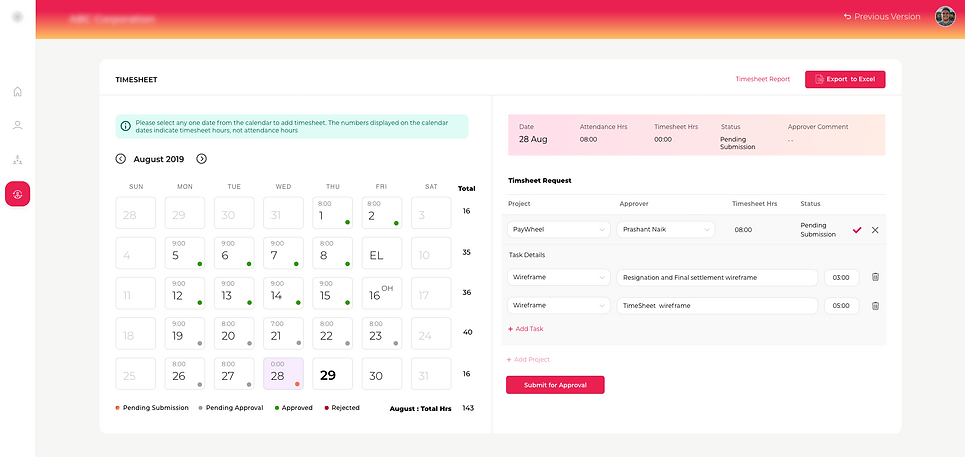
Manager want to capture team Project, task hours daily, weekly and monthly
Solutions Provided
Employee will add daily, weekly timesheet hours and send to Manager for approval
Design system
Typography


Color

Button
Handoff
Screens provided through zeplin
Survey
Help to understand feedback on new design
Survey questions
-
Which role fits you the best?
-
Rate the User Experience of new PayWheel : 1-10
-
Please describe your rating
-
Once you understood the UI features of New PayWheel UI on Desktop, did you enjoy the newly designed experience?
-
How intuitive is the New PayWheel UI on Mobile when you used it for the first time? Rate on a scale from 1 to 10 (You can choose not to answer this question, if you have not used New PayWheel UI on mobile)
-
Once you understood the UI features of New PayWheel UI on Mobile, did you enjoy the newly designed experience?
-
Select the features you DID NOT like in the New PayWheel UI. Select only the features you have used.
-
Did you face any issues while using the New PayWheel UI for any of your tasks on PayWheel? Do you think any Feature / Information is missing in the New PayWheel? Do you have any suggestions to improve the user experience of New PayWheel. Please describe.
Survey summary


Actionable Summary

Client feedback


Client 1
What a refreshing change from the earlier one. Wishing you and your team the best as you plan to roll out this and go-live. I like this calendar view request and approvals. Letter generation is very helpful no need to check all details.

Client 2
New View is always give us a refresh like our PayDay. Editing of Profiles/master data link option is good. Pay Register link in salary processing page is really helpful no need to other links.