
A bit of Storytelling
You have been hired to your dream job and you are going to join the company soon. You are excited, you will have new coworkers and work in an amazing workplace. You will do amazing things and then… then the first day arrives. And you know nothing. You are starting to get nervous: What should I do? What are my tasks and responsibilities? You want answers, so you decide to approach the HR Department at your new company. You ask your questions and they give you the ultimate answer. The best piece of information to ever exist: a paper brochure.
Onboarding experiences are important first steps for the interest of both, employees and the company itself. But why? From the employee’s perspective, they want to feel like companies care about them from the start. Moreover, HR teams want an efficient service that allows them to easily get employees onboard the company structure.
The transition from the hiring process to the first weeks at a new job should be smooth, comfortable and insightful: employees want to be ready for Day One. They want to avoid situations where they feel disoriented and where they have to be constantly making questions to their coworkers. Companies should also pursue such a smooth transition so employees can get into the company processes quickly. Maybe even more importantly, there is also paperwork to be completed and policies or values to be taught.
Brief
The Onboarding journey for employees to experience an insightful and more organic transition process. Company wants their employee onboarding to be seamless, stress free and personalized. Towards that company want to developed application.
The Challenge
MANUAL PROCESSES
FRAGMENTED DATA
Entire onboarding process was manual. They were onboarding 100 employees per year. While being tedious, repetitive and time consuming, it left too much room for human error.
Company hiring for separate business verticals and job roles, they had too many different types of Employee Application forms. Their data capture process was fragmented, often done manually by the recruiter who filled them after conducting a long drawn out Q&A session.
Target Audience
The application will be used by new recruited employee, recruiter, Hiring Manager who are part of onboarding process.
Research
During the research process, I had the pleasure to interview employees and HR Staff from company. My goal was to learn more about the HR-related processes and more specifically, those processes related to the transition of new employees. The first interview helped me find several pain-points across all HR processes. It was interesting to learn that the hiring and the onboarding processes were the least efficient and satisfactory ones. Since the interviewee, an HR assistant, seemed to put the focus on the onboarding experience the company had, I decided to further research the topic with 3 more interviews.
For the second interview, I was able to talk to an employee at “Martin”. This allowed me to get insights from the employee side of the experience. During this interview, I was surprised to find out how unsatisfactory onboarding processes are. The interviewee expressed that it would be nice to reduce paper form.
I also interviewed an HR employee, which helped me learn about the pain-points they are facing while new employee. HR departments value being able to send documents for employees to fill the multiple forms (paperwork) and sign.
Finally, I was able to interview an employee at “Abin”. We discussed the on-boarding process and how it felt for that employee. Interestingly, when he entered the company, they didn’t have any systems in place for this process. According to the interviewee, it felt chaotic to just land at the company the first day and have the typical fill multiple forms (paperwork). The employee expressed that he would like a funnier and more organic experience.
Brainstorming
Process
#1. Assemble the team
#2. Silently write ideas on cards
#3. Post the ideas on the wall
#4. Read, sort and group ideas
#5. Define and name groups
#6. Use ideas for the next phase

I classified specific comments and mentions from the interviews in sections: Current Onboarding Experience, Desired Onboarding Experience and HR Features

Research Insights
The research insights revealed that employees want to feel like companies care about them from the start, even before the first day at work. Moreover, new employees want to be well-prepared for that day so they can dive into their responsibilities immediately. From the other side of the process, HR teams believe that the onboarding experiences could be more friendly to new employees and more efficient for them: HR staff want to have more control and insights of the process.
During these stages of the project, I also designed several Use Cases that helped define how users would interact with the application and its possible features.
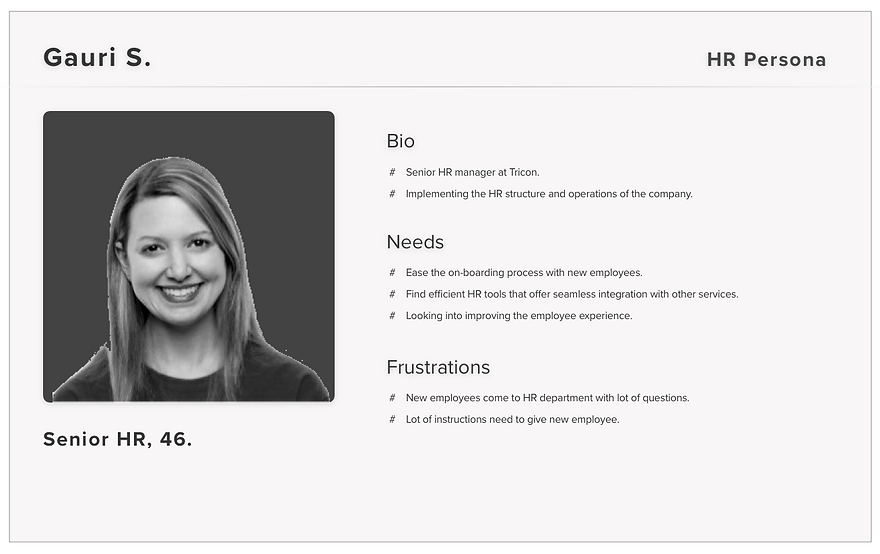
Persona

Problem Statement
It was also important to define a Problem Statement for both types of user before moving ahead.

Feature Prioritisation & MVP
With the whole research process in mind, I was able to start defining the MVP (Minimum Viable Product) and prioritising features. The features that made it into the MVP were prioritised based on two factors: Value to Users and Ease to Develop. For this part of the process, it really helped to discuss all the proposed features with developers and see what would be easier to develop while still keeping user value at optimal levels. The picture below shows how features were sorted out towards the definition of the MVP and the roadmap.

Prototyping
Once I defined what was going into the MVP, it was time to start generating ideas for the product. As stated in the brief, the product had to be a desktop web app. With the first paper prototypes, I wanted to explore some ideas that included awsome onboarding experience, since that is how the interviewees wanted the experience to be like. I sketched from the most basic and traditional options to the ideas.


Style Tile & Visual Design
Since the interviewees expressed that they wanted this experience to feel engaging, I came up with a visual style focused on the element, with button, text filed and combination of colors. I explored several possibilities and ended up choosing a palette of blues, with an accent blue.
For the typefaces, Work Sans used in application. Other combinations were explored too. For instance, PT Sans and Raleway were also considered. However, during user testing it was clear that the Work Sans typefaces felt better to users. Work Sans works really well for big bold titles and headlines, is very comfortable to read at small sizes.
In terms of Visual Design, I followed several best practices so every element is visible and readable enough.

The Final Prototype
I go through the final high fidelity prototype and explain some of its features. Once the company has created for new employees to get onboard, added employees receive a unique login link with their credentials: their email and a password. Employees log into the application and are ready to start the onboarding process.
Employee portal


HR portal

Business impact
" The joining process which took around 7 to 7.5 hours per candidate has now been reduced to just 15 minutes per candidate "
Conclusions
Creating a product for more than one different target user is a challenging journey to embark on. With Onboarding experience, I knew the type of experience employees might want and what features HR teams needed. However, finding ways to connect the needs of both types of user into one product was more complex than expected.
Sometimes as designers, we have to compromise based on user testing and further research. It’s also our responsibility to approach interviewees again and ask them additional questions in order to figure out how to solve those connections and what to compromise (as little as possible). The complexity of products like these (HR-related services) makes it more difficult to achieve success.
In conclusion, as designers we should understand the type of product we’re building and its complexity from the start because it will shape the whole design process, from the research to the prototyping stages. Understanding all types of user on our product and what they might need in each scenario is crucial for the success of the service.