IT Environment Management

Overview
Managing complex IT environments is a growing challenge for product teams, often leading to inefficiencies, increased risk, and misalignment. As Product Lead, I conceptualized and designed the "Define Environment" feature—a key component of our IT Environment Management solution. This feature enables teams to create, configure, and visualize environments seamlessly, reducing errors and improving operational efficiency.
Through user research, iterative design, and usability testing, I developed a solution that balances simplicity with advanced functionality. This case study outlines my approach, design process, and the measurable impact of the final product.
Team
-
Product Manager
-
Design Manager
-
10 Engineer
My Role
As the Senior Product Designer, I was responsible for:
✅ Feature Scoping – Defining the functionalities needed to
solve user pain points.
✅ User Research – Conducting in-depth research and interviews to identify key challenges.
✅ Interaction Design – Crafting user-friendly workflows and UI elements.
✅ Conceptualization – Bringing innovative solutions to enhance user experience.
✅ Design & Prototyping – Creating and refining wireframes, high-fidelity designs, and prototypes.
Timeline
-
Design Handed off in Q2 2024.
-
Launched in Q4 2024.
Collaboration
Throughout this project, I collaborated closely with:
-
Development Teams: Ensured feasibility and technical alignment.
-
Quality Assurance (QA): Validated that the feature met quality standards and user requirements.
-
Stakeholders: Maintained open lines of communication for feedback and alignment.
Problem Statement
Context
Product teams face significant challenges in managing their environments, leading to:
🔹 Complex Configuration Management – Setting up environments for different stages (development, testing, staging, production) is difficult and error-prone. This complexity often results in misconfigurations that can lead to delays or even system failures.
🔹 Lack of Visibility & Control – Teams struggle to monitor environment status, leading to delays in issue resolution. There is a lack of centralized visibility into the status, health, and performance of different environments. This makes it difficult for teams to proactively identify and address issues before they impact production systems.
🔹 Manual & Inefficient Processes – Reliance on manual processes slows down the development lifecycle.
🔹 Inconsistent Environments – Differences across environments create late-stage issues, increasing costs. Inconsistencies between different environments (e.g., dev vs. prod) can lead to issues that only surface late in the development process
💡 Solution:
Teams need an intuitive, automated, and centralized way to define, organize, and manage IT environments efficiently.


Project Strategy
To ensure a comprehensive approach, I follow design process:
🔹 Design Workshops: Collaborative sessions with stakeholders to gather insights and align on goals.
🔹 User Interviews: In-depth 1:1 interviews with Development and Quality Engineering (QE) teams to understand workflows and pain points.
🔹 Competitor Analysis: Researched existing solutions to identify opportunities for differentiation.
🔹 Low-Fidelity Wireframes: I started with low-fidelity wireframes to visualize the initial concepts and user flows.
🔹 High-Fidelity Designs: Based on user feedback, I transitioned to high-fidelity designs, focusing on usability, accessibility, and overall experience.
🔹 Interactive Prototypes: I developed interactive prototypes to simulate the user experience and gather feedback from stakeholders.
🔹 Design Components: I worked closely with the engineering team to ensure the design components were aligned and implementable.
🔹 Stakeholder Feedback: Gathered feedback from key stakeholders, including executives and cross-functional teams, to refine the designs and ensure alignment with business objectives.
🔹 Design Handoff: Prepared detailed design specifications and assets for the engineering team, facilitating a smooth handoff and seamless implementation.
Accessibility Considerations: Ensured compliance with WCAG (Web Content Accessibility Guidelines).
.jpg)
.jpg)
What is IT Enviornment
In the context of IT management, an environment refers to a designated space where applications and services are deployed. This space can vary widely depending on the infrastructure, ranging from a physical server to a virtual machine, Kubernetes cluster, or cloud service.
Environments are the backbone of an organization's deployment pipeline, helping teams organize their deployment targets into groups that align with development stages. Common examples include:
-
Development: Where new features are built and tested by developers.
-
Test (Staging): Where updates are tested to make sure everything works.
-
Production: The live environment where the application is available to users.
Broadly, an IT environment encompasses:
-
Hardware and Software: Physical and virtual resources.
-
Network Resources: Connectivity and communication channels.
-
Services: Tools and platforms required to operate and manage IT infrastructure.
By defining and managing these environments effectively, teams ensure smooth development, testing, deployment, and operations processes while mitigating risks and enhancing collaboration.
Discovery and Research
Plan
Research
activity

Goals
Design Workshop
Key Findings from Design Workshop
📌 Identified key personas and user journeys.
📌 Uncovered common challenges such as lack of centralized information and difficulty managing interdependent environments.
What we did together
-
Conduct 2-hour workshops with all stakeholders and a 1-hour continuation workshop with PM.
-
Asked participants to answer “What do you know about users?” for four key focus areas.
-
Facilitated participant votes on their post's ability to meet outcome and feasibility.
With this information, scope design features, created persona and problem statement and User journey map. Define use cases.
Workshop attendees


Findings from design workshop
Persona
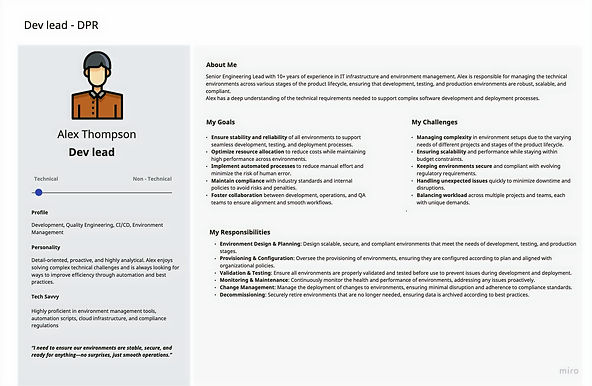

User Journey
User Journey Highlights:
-
Users reported a lack of centralized information regarding environment status.
-
Difficulty managing interdependent environments created confusion.

Findings from 1:1 interviews with end users
What we did together
-
Three interviews 1:1 with Dev and QE
-
Asked participants to answer How currently work with the Environment. What are the challenges and workflow
With this information, helps to understand user behaviour and pain points
Workshop attendees

Findings from User Interviews
🟢 Frustration with manual processes was a common theme across interviews.
🟢 A pressing need for a unified source of truth regarding environments was identified.
🟢 Setup times frequently exceeded 4+ hours, leading to delays in development cycles.
Lack of a single source of truth for environment details.
Difficulty in managing environments across multiple teams.
Confusion around environment dependencies.
Instances are provisioned in about 4 hours, with notifications sent upon readiness.
Secondary Research
Competitor Analysis

Solution by Design
Task Flow & Features
The "Define Environment" feature was designed to streamline key use cases:
✅ View All Environments – Provides a centralized dashboard for visibility.
✅ Create New Environment – Enables fast and intuitive setup.
✅ Monitor Health Status – Helps teams proactively address issues.
✅ Delete Environment – Streamlined process to decommission unnecessary environments.
✅ Environment Version Tracking –Track and maintain consistency across deployments.
✅ View All Environment
Title: View All Environments for a Product
As an engineering lead, I want to view a list of all environments associated with my product so that I can quickly understand the current deployment landscape and make informed decisions.
✅ Create a New Environment
Title: Create a New Environment for a Product
As an engineering lead, I want to create a new environment for my product so that I can test new features or set up a specialized environment.
✅ View Environment Health Status
Title: View Health Status of Environments
As an engineering lead, I want to see the health status of each environment for my product so that I can quickly identify and address any issues.
✅ Delete an Environment
Title: Delete an Environment
As an engineering lead, I want to decommission or delete an environment that is no longer needed so that I can free up resources and reduce costs.
✅ Environment Version Tracking
As an engineering lead, I want to track the versions of software deployed in each environment so that I can ensure consistency and troubleshoot issues effectively.

Approaches and Ideation

Wireframes and Prototyping
The "Define Environment" feature was designed to optimize the following use cases:
🔹 Developed low-fidelity wireframes to visualize initial designs, with a focus on user flows.
🔹 Transitioned to high-fidelity prototypes based on user feedback, enhancing usability, accessibility, and experience.


Usability test
To evaluate how effectively the new "Define Environment" feature within the Digital Product Release (DPR) workspace meets the needs of users, particularly Dev Leads and QE team members, in managing and viewing product environments.
Walkthrough Low-fidelity wireframe and gather feedback.
Low-fidelity wireframe prototype used for this activity
Scenarios covered
-
Viewing Installed Environments
-
Requesting New Environment
-
Check if there are adequate indicators or information about environment status.
-
Feedback on Overall Workflow
-
Gather user's opinions on the overall workflow of managing environments.
-
Identify any pain points or areas where users feel the process could be improved.
Findings
🟢 Terminology: Users found the new terminology (e.g., "instances" vs. "environments") more intuitive.
🟢 Current Process: Suggested environment templates were well-received, reducing setup time and minimizing duplication. Users demonstrated how they are currently requesting environments, which are created based on teams (with "team" means "product" for e,g DevOps).
🟢 Feedback on Features: One user found the idea of suggesting potential environments useful.Another user was initially unsure but later thought that showing potential environments could help avoid duplication.
🟢 Linking Instances: Clarified the role of CMDB (Configuration Management Database), helping teams better understand linked services. Users had questions about how services or instances would be linked to products. After explaining the role of the CMDB, users understood, but the initial question indicated that this process was not immediately clear.
🟢 Instance Creation: Users mentioned that they typically create instances before associating them with products.
Measurable Impact
📉 35%
reduction in environment setup time.
📈 User satisfaction scores
Increased user satisfaction scores, indicating improved clarity and efficiency.
👍 Intuitive UI
Positive feedback on intuitive UI and seamless workflows.
Reflection
"I’m proud of how my contributions have simplified workflows and significantly enhanced user satisfaction. The feature addresses the complexities of IT environment management, resulting in a more intuitive experience that aligns with our users’ needs for collaboration and productivity."
Future Directions
Looking forward, considerations for iteration and enhancement include:
-
Gathering continuous feedback through analytics and user surveys to inform future development.
-
Exploring integration with other tools in the productivity ecosystem to enhance overall user experience.
-
Conducting regular usability sessions post-launch to iterate and improve based on real-world usage scenarios.
🔹 Next Steps:
The insights gathered during this project will guide future initiatives, pushing the boundaries of how products are developed and managed within IT environments. This foundation lays the groundwork for ongoing improvements in user experience and efficiency in IT management.
-
Expand automation capabilities for faster environment setup.
-
Improve monitoring and reporting features.
-
Explore AI-driven insights for predictive environment health analysis.